
Overview
Cash Concentration Exceptions is a surveillance feature in StratiFi that automatically monitors cash allocation levels across your client portfolios. When cash holdings fall outside your firm's defined thresholds, the system creates an exception for your review, helping you stay proactive on portfolio suitability and Reg BI compliance.
Note: This is an add-on feature. It must be enabled by your StratiFi Customer Success Manager before your firm can configure and use it. Contact support at +1 (650) 675-2556 to get started.
How It Works
The system evaluates cash concentration nightly across all eligible portfolios. During each cycle:
-
Portfolios are checked against your firm's configured cash thresholds
-
New exceptions are automatically created when cash falls outside the allowed range
-
Existing exceptions are automatically resolved when portfolios return to healthy levels
Setting Up Cash Concentration Monitoring
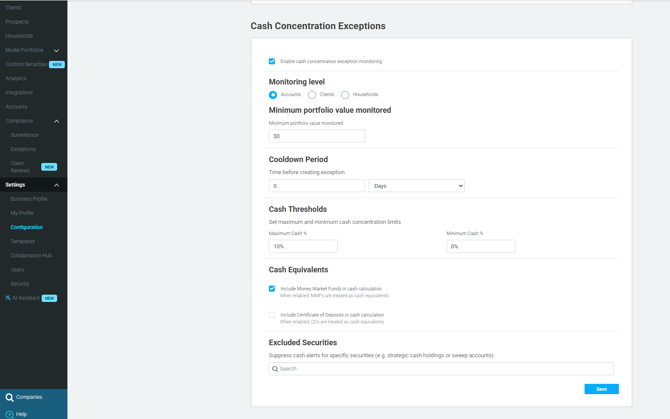
Once the feature is enabled for your firm, your company manager can configure it under Settings > Compliance > Cash Concentration Exceptions.
Enable or Disable Monitoring
Use the toggle to turn cash concentration monitoring on or off. When disabled, the system keeps existing exceptions but does not create new ones.
Define Your Cash Thresholds
Set the acceptable range for cash in your portfolios:
-
Maximum Cash % — Portfolios exceeding this percentage trigger an exception (e.g., 50%)
-
Minimum Cash % — Portfolios falling below this percentage trigger an exception (optional)
-
Default: Maximum 50%, no minimum enforced
Cash Equivalents
Choose which instruments count as cash in the calculation:
-
Money Market Funds — Counted as cash by default
-
Certificates of Deposit (CDs) — Counted as cash by default
Monitoring Level
Select how portfolios are aggregated for evaluation:
-
Accounts — Evaluates each account individually
-
Clients — Aggregates cash across all accounts for a client
-
Households — Aggregates cash across all accounts in a household
Minimum Portfolio Value
Set a minimum value to exclude small portfolios from monitoring. Default: $10,000. This prevents misleading alerts on low-value accounts.
Excluded Securities
Exclude specific securities from the cash calculation (e.g., strategic cash holdings or sweep accounts). Excluded securities do not trigger exceptions.
Viewing Your Cash Concentration Exceptions
Go to Compliance > Exceptions > Cash Concentration tab. The exceptions table shows:
|
Column |
Description |
|---|---|
|
Status |
To do, In progress, Resolved, Snoozed, or Closed |
|
Target |
The account, client, or household with the exception |
|
Advisor |
Advisor(s) associated with the portfolio |
|
Supervisor |
Supervisor responsible for the advisor |
|
Value |
Total portfolio value |
|
Cash % |
Current cash concentration that triggered the exception |
|
Age |
Time elapsed since the exception was created |
|
Last Updated |
Most recent update to the exception |
Cash concentration exceptions also appear on the Client Detail Page under the Exceptions tab.
Managing an Exception
Use the standard workflow to action each exception:
-
To do — New exception requiring your attention
-
In progress — Actively being addressed
-
Snoozed — Temporarily deferred
-
Resolved — Issue corrected (set automatically when cash returns to healthy levels, or manually)
-
Closed — Reviewed and closed
Exporting Exceptions
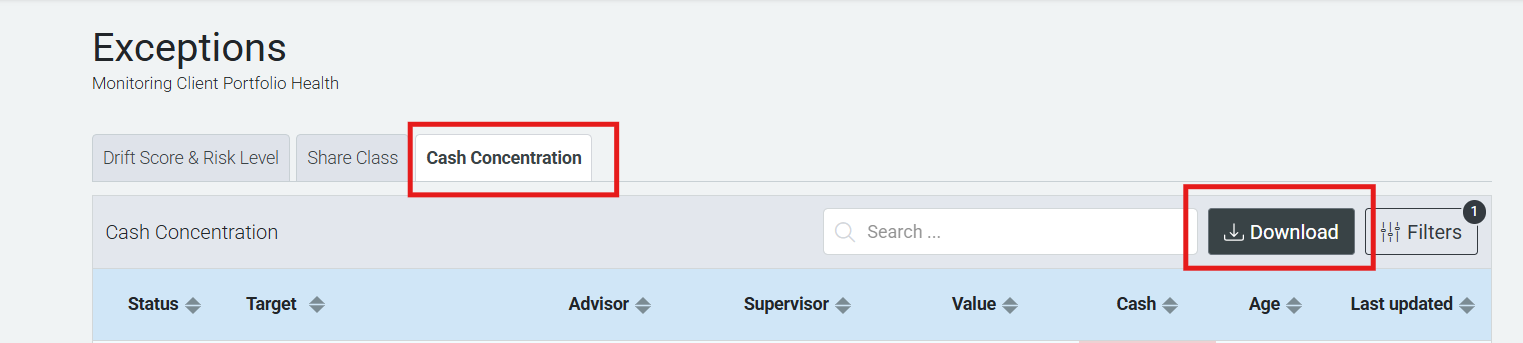
Go to Compliance > Exceptions. Click the Download button in the Cash Concentration tab to download exceptions as CSV or Excel. Exports respect any active filters and your user visibility permissions.
Key Notes
-
Cash concentration rules are evaluated nightly
-
The system prevents duplicate exceptions — no new exception is created for a portfolio until the existing one is resolved
-
Advisors only see exceptions for portfolios within their assigned visibility scope
-
Company managers can view all exceptions across the organization
Need Help?
Contact StratiFi Support at +1 (650) 675-2556 or reach your Customer Success Manager directly.